Data building blocks
Object storage
Store files and media in S3-style object stores. Keep bytes out of your app servers and databases, and design uploads, metadata and costs around that split.
Every product eventually stores bytes that don't belong in a database. Think profile photos, uploaded PDFs, video, backups and logs. Object storage is where those bytes go. Amazon S3, Google Cloud Storage, Azure Blob Storage and Cloudflare R2 are examples, and MinIO and Ceph are self-hosted options.
Object storage is also easy to misuse. Teams route gigabytes of uploads through their app servers, lose track of which objects belong to which rows, pay surprise egress bills, or keep petabytes in the most expensive class for years. The pages below cover how the store works and how to use it well.
Concepts on this topic
| Step | Concept | What it answers |
|---|---|---|
| 1 | The object storage model | What is an object, and how is it found? |
| 2 | Durability and erasure coding | How does the store avoid losing bytes? |
| 3 | Presigned and multipart uploads | How do clients upload without touching your servers? |
| 4 | Metadata and object consistency | How do the database and the store stay in step? |
| 5 | Storage classes and egress cost | What does storage cost, and where does the money go? |
| 6 | File sync design | How does a Dropbox-style client sync changes efficiently? |
Common mistakes
- Routing uploads through app servers. A 2 GB file ties up a server's connection and memory. Use presigned URLs.
- Losing track of orphans. Bytes without a row cost money forever. Write intent first and garbage-collect.
- Public buckets. Misconfigured public buckets leak data. Keep buckets private and serve through a CDN or signed URLs.
- Ignoring egress. Data sent to the internet often costs more than storage itself.
Design rule of thumb
Any design that touches media, such as chat attachments, a photo feed or video streaming, should say four things. Bytes go to object storage. Metadata goes to a database. Uploads are direct and multipart. Reads come through a CDN, with lifecycle tiers for old content.
In an interview, do the cost arithmetic when storage is large. It's often the factor that decides the design.
Key takeaways
- Object stores hold immutable blobs under flat keys. They trade in-place edits and low latency for scale, durability and low cost.
- Erasure coding survives more failures than three copies, at a fraction of the storage.
- Clients upload directly with presigned URLs. App servers sign URLs and record metadata.
- Keep metadata in a database and bytes in object storage, with cleanup for crashes.
- Lifecycle rules cut storage bills. Egress is often the largest cost, so serve hot content through a CDN.
Further learning
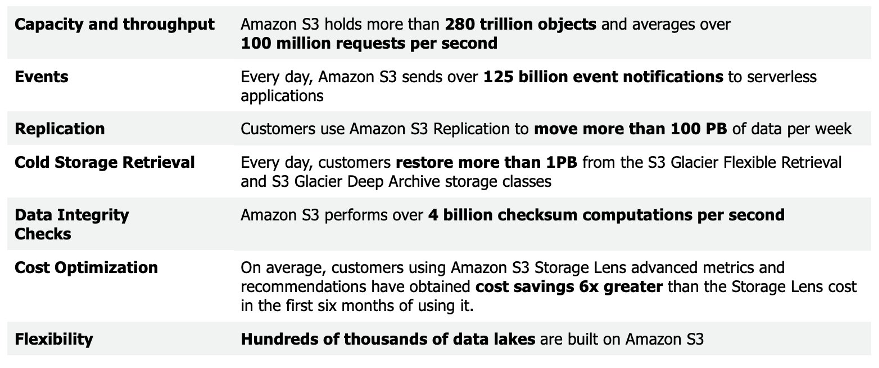
AWS's re:Invent deep dive on S3 covers durability, scale and performance from the team that runs it.
James Cowling's InfoQ talk on Magic Pocket is a rare look inside an exabyte-scale blob store.
 Amazon S3 User GuideStore data in the cloud and learn the core concepts of buckets and objects with the Amazon S3 web service.docs.aws.amazon.com
The Google File Systemgfs-sosp2003.pdfstatic.googleusercontent.com
Inside the Magic Pocket (Dropbox)Inside the Magic Pocketdropbox.tech
Amazon S3 User GuideStore data in the cloud and learn the core concepts of buckets and objects with the Amazon S3 web service.docs.aws.amazon.com
The Google File Systemgfs-sosp2003.pdfstatic.googleusercontent.com
Inside the Magic Pocket (Dropbox)Inside the Magic Pocketdropbox.tech
Related
CDNs and the edge
Serve content from points of presence near users. A CDN cuts latency, absorbs attacks and cuts bandwidth costs, and its cache keys, headers and purge rules decide how well it works.
Case study: video streaming
YouTube and Netflix-style delivery, with resumable uploads, parallel transcoding into a bitrate ladder, HLS and DASH adaptive streaming, and CDN economics.
Files and storage
How file systems map names to inodes, how journaling and the page cache affect durability, and how the storage devices underneath behave, from SATA disks and SSDs to cloud volumes.